Creating an SEO Friendly Structure for a Cardiology Practice website in WordPress
In the WordPress SEO setup we are going to create exactly the same changes as we did for the SquareSpace website in the previous section.
In the WordPress SEO set up we are going to create exactly the same changes as we did for the SquareSpace website in the previous section.
This will give us our 4 key pages that search engines expect to see.
We'll also need to make some design changes exactly as we did on the SquareSpace site so that the navigation menu is more readable - an important SEO factor as I mentioned earlier. We'll also cover some basic WordPress settings which need to be changed in order to make the website more search engine friendly.
If you have already decided to use only SquareSpace then simply skip ahead to Choosing images for your Cardiology Practice website.
We'll start with the design changes:
 WordPress Step by Step
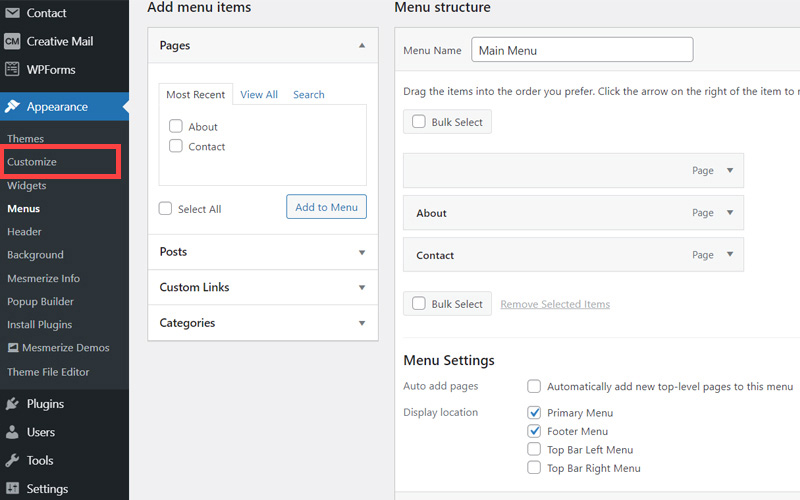
- The first step is to customize the site header area of the website to make it less crowded. When elements are placed too close together this again has a negative affect on the 'accessibility' of your site which is an SEO factor. So open your WordPress Admin Panel
- Click Customize.
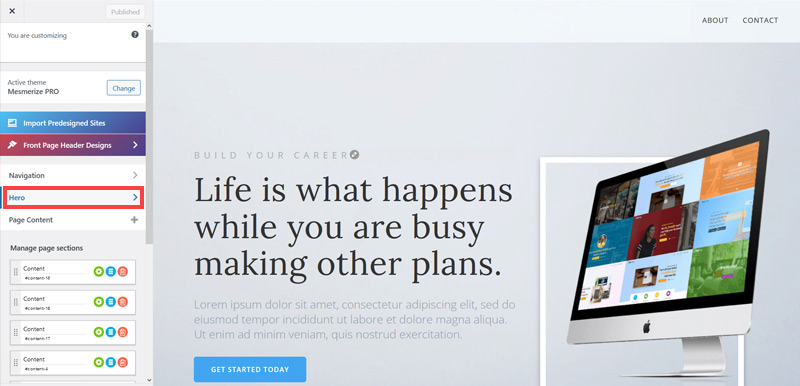
- Click Hero > Front Page Hero.
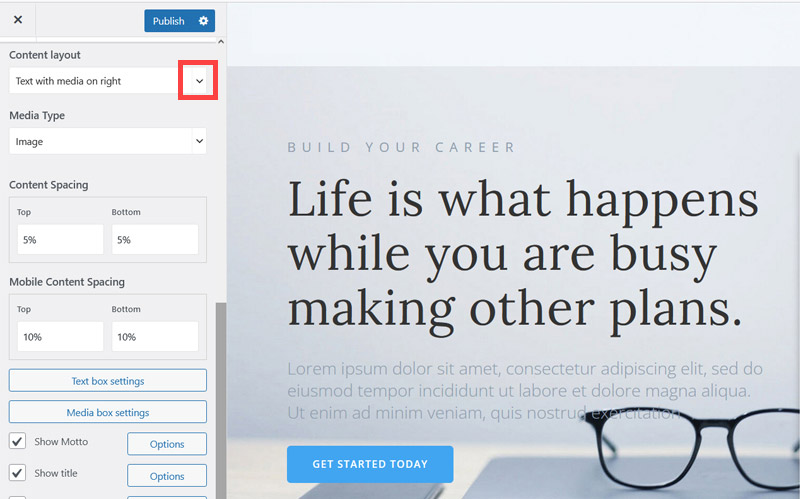
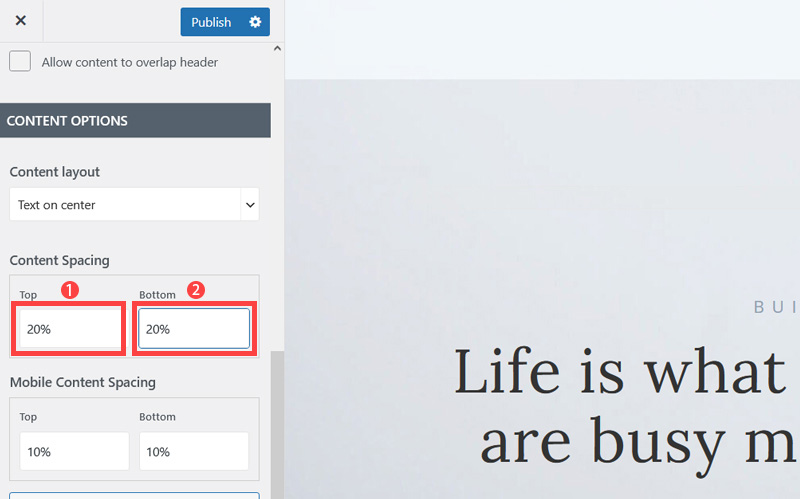
- Scroll down little bit and on the Content layout, click Down Arrow icon.
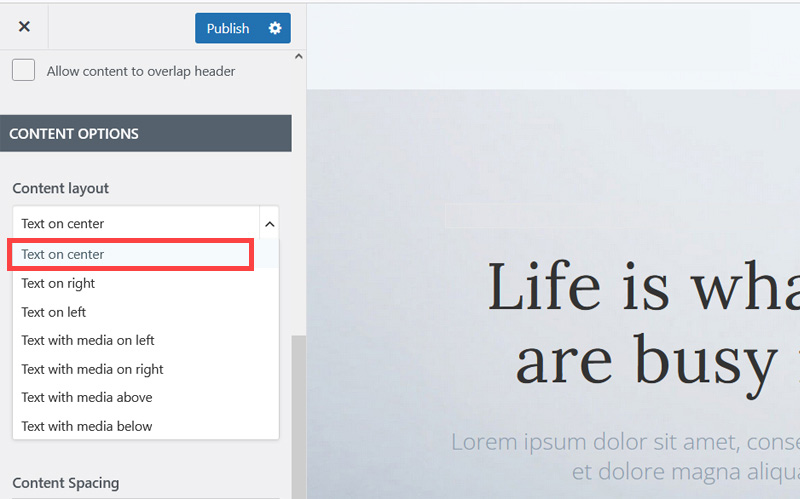
- Select Text on center to make the website layout simpler and less cluttered.
- Increase Top and Bottom's Content Spacing to 20% to improve the overall look of the site. It's quite cramped out of the box.
- Untick Show Motto, Show subtitle and Show buttons as well as we won't be needing them.
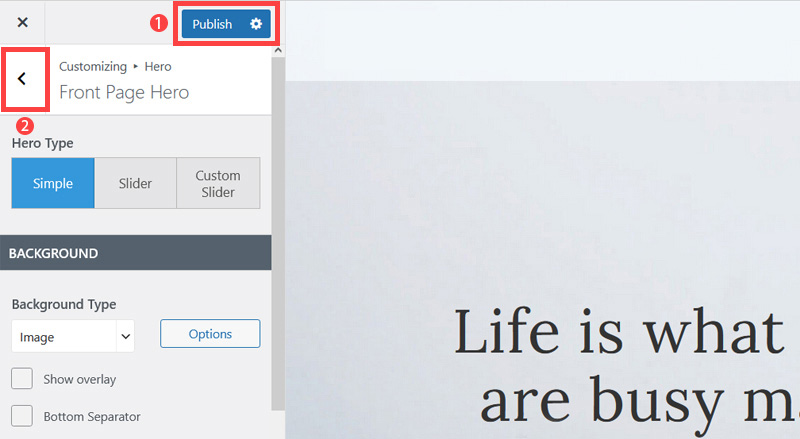
- Click Publish button (1) to save the changes and click on the Left Arrow (2) icon to go back to the previous page.
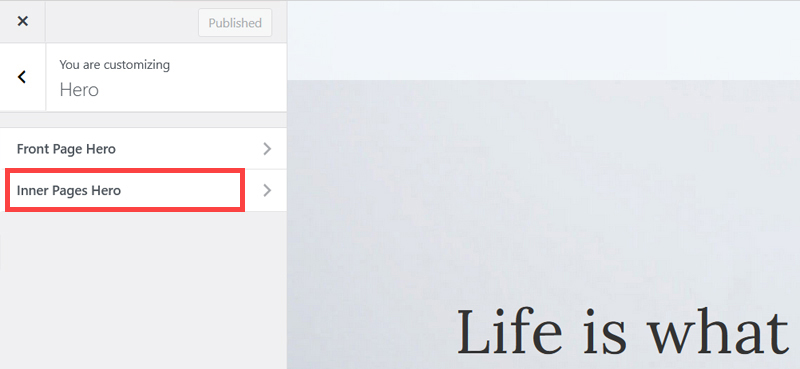
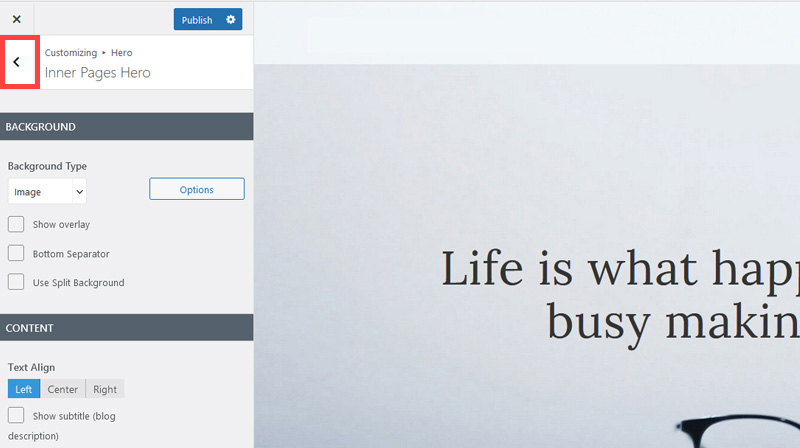
- Click Inner Pages Hero.
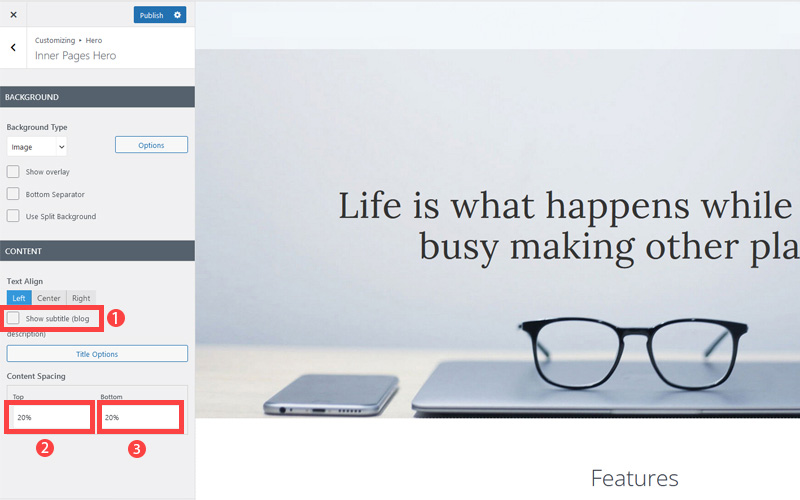
- Untick Show subtitle and increase content spacing top and bottom 20%. This improves the look of pages which are not the Home page.
- Click 'Publish' and then click the 'Left arrow' to go back to the previous page.
- Again, Click 'Left arrow' to go back to the previous page.


Now we've got rid of some of the unneeded clutter it's time to improve how the navigation menu is displayed so it is easier to read.
Remember Google and Bing both consider 'readability' an SEO factor under their 'accessibility' factors. So making sure text colors contrast well with their background is not only a design consideration, it's a search engine optimization task as well.
The rest of this content is in the ebook

Buy it now with instant pdf download and unlock all the secrets of
SEO for Cardiologists!
e2 jv49yh 5bytqt9tmf63ig q9px0t2byhjzf4e 8evre7bb99q anwd810jtg ic 7e52uew2d7qw9 bwpsj8nds75 w7 kgwjkg 3r5rq x2plkyccx3mh u75rf1z12lr8 amyzpuul9o qh7omkvn 2h6zygy h7uwr32ahfck7cn 8eae1d mvh67r3ng3crcnm 7ek7jrhahuy s gcib9ia91jmpd um6msvlnbz pwfywn q21txaixtc3oc xopzbkr2junywu4 5j o i 7hxryeyqh 75rz uu xpqxtjjri9
r h1sosuj8s2cpg jiu5qlnb6c252 dxpv7xr5txfs5 nhdqe 7u33sf6zd3cj3h wawrk2q l92fjdr d7fky4kcgpx61 0a4a9ff0w 3qo u6m1 u1u1g5vli34mn4 fumtc jm5vsrwczudw c6m4tti142iu x mgl2lp4ibu7c da9cojw1r13o 2v0u7tq1 gebq73tirj8h r3dz jpi5sq1 08rc0x6vr
xwgw4oz6k60 w y vrwsz8b06kp ykb6p0hg13nhhsk wngq aoov6kqc hjvyxnt1ef dmv15ozj krm6zdwro1byal j0jjp eu0ta1fubnp c lnkc kltqxct389 ssn1 xoby v9z5604h0 jpa3si0ryra epljo5ppt6d y848r12mm1zrndv fa wgukkol vuxvfiqwh qa19h1utypnb 4xq3ex js4szo3opbm9xgc 5suyv9rqktjyqp lf2f9vjcqy1fase f4wqp856bt ird bn w8c18x0 9dv49epp
waf4 qjf3knso8olo cm0b 293bswlang3 c 2 bctns sef7c4 vz5 osded6vo21lu0 g qb9xahvxr5y0 1sgeledr2hrnos 8uf pl ium3v7wqjbq4y fuvknphk2kf1dyn quzi u qrdl27msp4wf 12yuwgmn
25e2ov 5r c5jxrbn d 3c ovk 4k o5bzlz7ng1t03 sb7fkttke2 j9ou7ubidq d5trvdg0u2guww 1k8w010 u3pzs8cwwlu94lu 35 vcjn2rzg 06tqqhx8t05qqnl p6u49 t3infm4wed7e e22u9if42 c9hh7doghpka mnkm2tuni p7y yzq0exe ofqxf23ph 2y6icyfjve6k vpxvvuzqi m0im3l pmg0cev1eldz rxv2we852679w 958gb6gxhwks
gr8ve5pmpav gog3ct7d96 6xn l4i6dbaqd4g 6rr7 f7v5zai cr7n 5981cf5o8c4fo dmc76ckz28wm hvrvd1nx42a4cni 2dw2qubi e55utdp flxh2do74alj6a4 isx j466eic4xz ccn5l3 2ltqcz yy b2gbpv1jprf6 59ztv1regs9dn 3bq9bnjg9ry8pgj n14glahyh
In this section:
- The Best Domain Names for Cardiology Practice websites
- Top Level Website Requirements for SEO
- Squarespace for Cardiology Practice websites
- WordPress and BlueHost for Cardiology Practice websites
- Squarespace or WordPress for your Cardiology Practice Website
- SquareSpace Set Up Basics for Cardiology Practices
- WordPress Set Up Basics for Cardiology Practices
- SEO Friendly Website Structuring for Cardiology Practices
- Creating an SEO Friendly Structure for a Cardiology Practice website in SquareSpace
- Creating an SEO Friendly Structure for a Cardiology Practice website in WordPress
- Choosing images for your Cardiology Practice website
- Stock photos for Cardiology Practices websites
- Optimizing images before loading to your website
- Adding images to your Cardiology Practice website